The LS KDS Utility is a stand-alone program to manage the configuration of the Kitchen Service for various data providers. It is installed with the Kitchen Service setup.
LS Central version 13.04 and later use only a KDS Web Service to supply information to the Kitchen Service. The configuration cannot be sent from LS Central to the Kitchen Service.
The KDS Utility must be used to do that.
- Start the KDS Utility by double-clicking the desktop shortcut, or locate it in the Start Menu, or as a third option locate the application file C:\Program Files\LS Retail\Kitchen Service\LS KDS Utility.exe and double-click it.
-
Start by setting the field KDS Data Provider to WEB Service. Only the necessary fields for connecting to the Web Service are then shown.
If you are configuring for the first time, the window will look like this: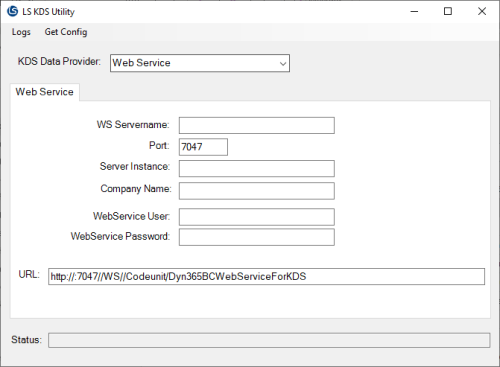
Otherwise, the fields are filled with data from the Kitchen Service configuration file.
There are two ways to populate the fields:
- Fill in the fields with the correct data and the URL will be built up from that information
- Copy the SOAP URL from LS Central and paste it into the URL field. The other fields will be filled with the information from the URL string.
The correct URL can be located in the Kitchen service configuration in LS Central
Fields to be set are:
WS Servername This is the host name of the server where the LS Central service tier runs. Port This is the port number which the Web Service listens on. This is usually 7047, but can be different depending on how the BC service tier is configured. Server Instance The name of the BC service tier. Usually the value is BC. Company Name The name of the Company in LS Central. WebService User You can leave this field empty, if the Dynamics Business Central service tier is running on the same domain on-premise, and the Log On user on the Kitchen Service is set to a user with authentication to the Web Service.
Otherwise, the field should be set with a BC user name which has access to the Web ServiceWebService Password Password for the Web Service user if a user name is set. URL This is the SOAP URL. It can be found in the Kitchen service configuration in the LS Hospitality system. The Kitchen Service will use this URL to connect to the BC WebService when it starts up. Here is an example of a Web Service configuration:
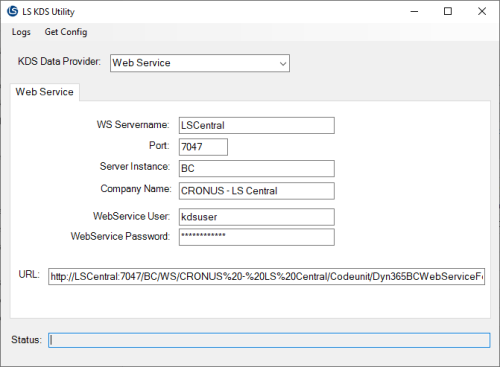
-
If changes have been made, click Get Config in the top menu to save the Kitchen Service configuration.
The configuration will be saved in the file C:\ProgramData\LS Retail\Kitchen\KitchenServiceConfig.config.
The utility then tries to connect to the KDS Web Service, and if it is successful it will show a dialog window similar to this one: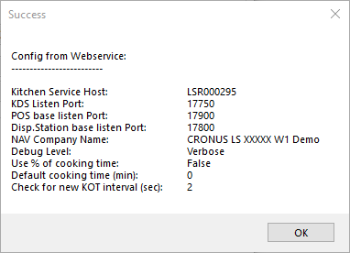
- Restart the Kitchen Service.
If there are errors, you can examine the KDS Utility Log by clicking Logs in the top menu and then Show Utility Log. The log file opens in Notepad.
You can also open the last Kitchen Service log file by clicking Logs in the top menu and then Show KS Log. This will open the log file in Notepad.